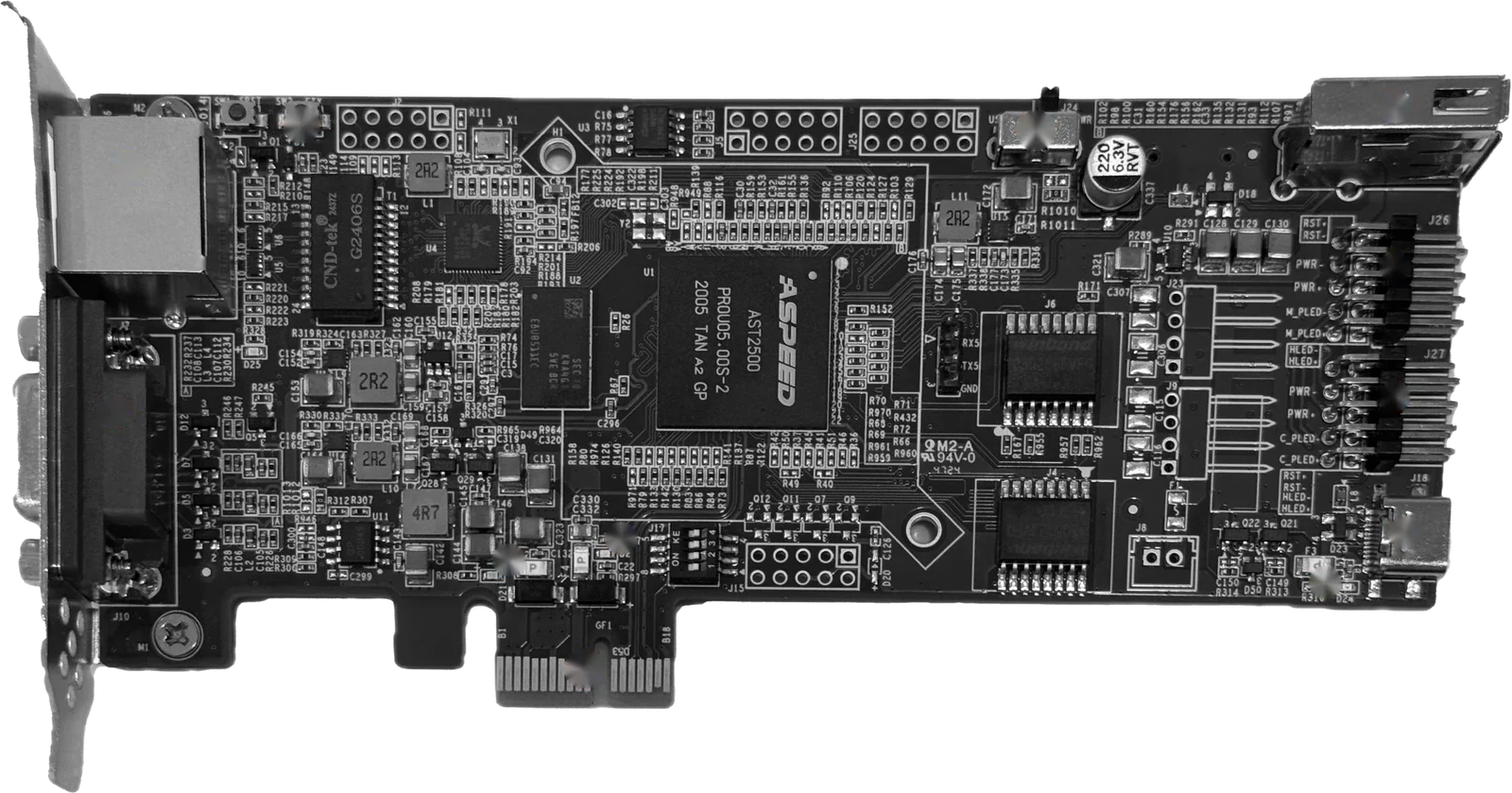
Toplink Smart Control Card · IPMI-based remote management card

An IPMI cardfor servers and PCs without one.

Fit it in a PCIe slot, connect the power-switch header and USB, and servers, workstations and ordinary PCs without IPMI get remote video, keyboard and mouse, power control and OS reinstalls, even when the system has crashed, blue-screened or lost its network.

Retail¥599/ card

View specifications
Toplink Smart Control Card K1 · product photo

Toplink Smart Control Card K1 · product photo

Two problems solved

No IPMI? You can still fix it remotely.

01

Servers without IPMI

Older servers, PCs turned into servers, workstations and NAS boxes have no BMC. When they hang, blue-screen or lose their network, someone has to go on site. The card is separate hardware, independent of the motherboard, CPU and operating system, so it stays online when the system does not.
02

No way to power on remotely

Once an ordinary PC is shut down, its network goes with it and remote desktop or SSH no longer help. The card is wired to the power button through the ATX header, so as long as the card has power you can press the power button remotely.

Capabilities

The core of IPMI, on one card.

  • 01

    Remote video

    Web console and VNC up to 1920×1080 at 60 Hz, from POST and BIOS to the desktop.

  • 02

    Keyboard and mouse

    USB keyboard and mouse emulation for BIOS settings, installers and the command line.

  • 03

    Power control

    Power on, shut down and reset through the ATX header, with the chassis buttons still working.

  • 04

    Virtual media

    Mount ISO images remotely and reinstall without plugging in a USB stick on site.

  • 05

    Built-in display

    The PCIe edge connector gives the host a display function, so machines without a graphics card still show a picture.

  • 06

    Independent of the OS

    Does not rely on the motherboard, CPU or operating system; works through crashes, blue screens and network loss.

  • 07

    Encrypted connection

    Remote access runs over an encrypted connection to protect management data.

  • 08

    Ready for automation

    Built on IPMI technology, so it fits into provisioning and operations automation.

Hardware

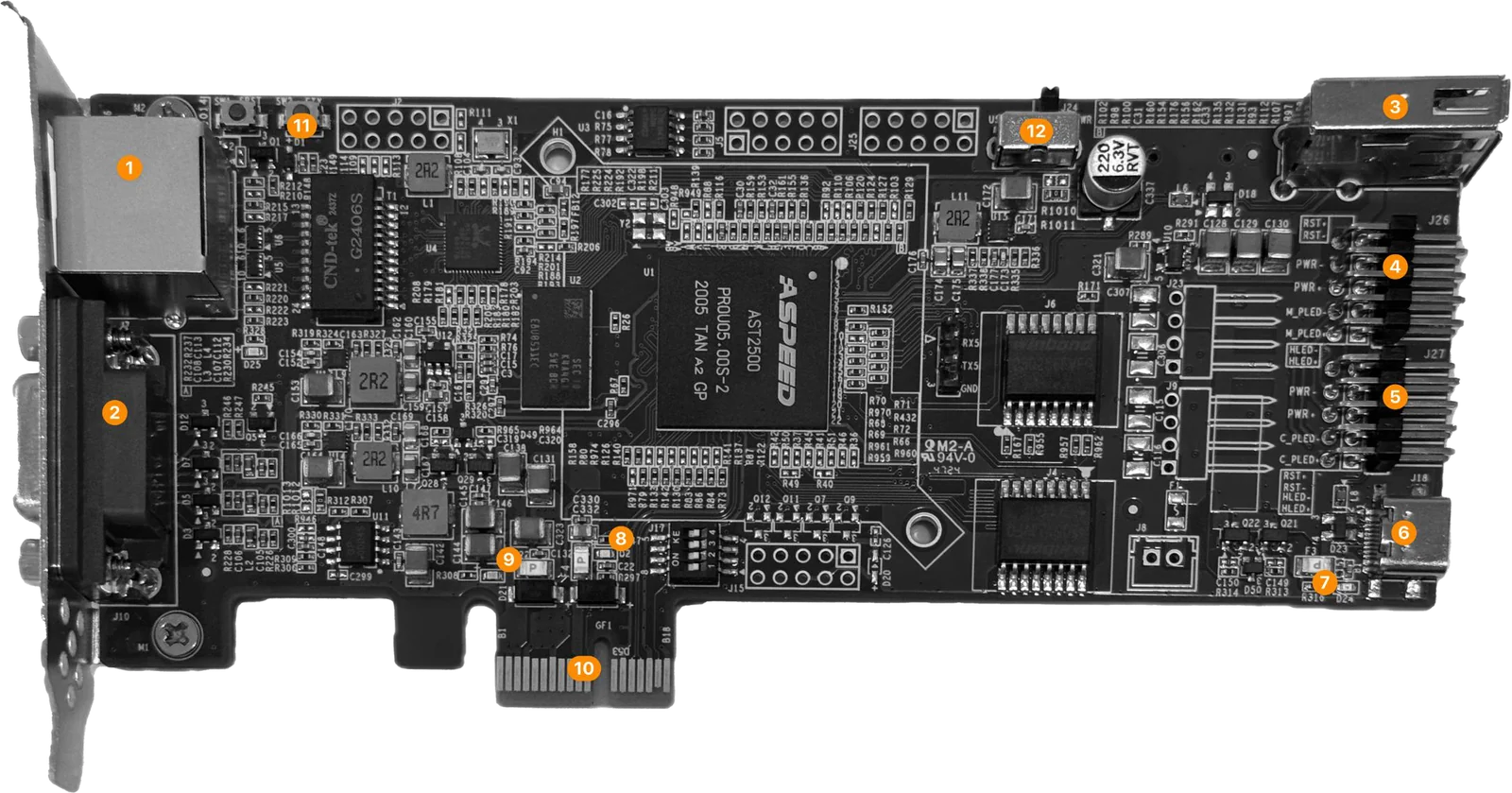
A low-profile PCIe card with everything labelled.

Toplink Smart Control Card K1 · numbers match the list
  1. 1RJ45 network port
  2. 2VGA display output
  3. 3USB-A device port
  4. 4ATX header pins (to the motherboard)
  5. 5ATX header pins (to the chassis)
  6. 6USB-C data port (keyboard/mouse emulation, power)
  7. 7USB-C power LED
  8. 8BUSY LED
  9. 9PCIe power LED
  10. 10PCIe edge connector (display function, power)
  11. 11Factory reset button
  12. 12Power source switch (USB / PCIe)
Specifications

Specifications

Model
K1
Controller
ASPEED AST2500
Host interface
PCIe
Dimensions
151 × 53 × 22 mm
External ports
1 × 10/100/1000M auto-negotiating RJ45; 1 × VGA
Internal ports
1 × USB-A; 1 × USB-C (data + power); 2 × ATX header; 1 × factory reset button
Power input
Type-C 5 V @ 1 A, or PCIe 12 V @ 0.5 A / 3.3 V @ 0.375 A, selected by switch
Video
Web console, VNC and physical VGA up to 1920×1080 at 60 Hz
LEDs
Identify solid blue; SYS blinking green; USB PWR and PCIe PWR solid green
Environment
Operating 0–40 °C; storage −40–70 °C; humidity 10%–90% RH, non-condensing
In the box
1 × PCIe card; 1 × ATX 9-pin to 9-pin cable; 1 × ATX 9-pin to header cable
Installation

Three connections, no motherboard changes.

  1. 1

    Card and network

    Insert the card into a free PCIe slot and connect a network cable to its RJ45 port.

  2. 2

    Power switch

    Connect pins 4 on the card to the motherboard front-panel header with the 9-pin to 9-pin cable; to keep the chassis buttons, connect pins 5 to the chassis leads with the 9-pin to header cable.

  3. 3

    USB

    Connect the card's USB-C port to a USB 2.0 header on the motherboard to enable keyboard/mouse emulation and virtual media.

Use cases

Servers in the data center, PCs in the office.

  • 01Data center managementAdd out-of-band management to existing servers that have no IPMI.
  • 02Server managementRecover from hangs, blue screens and bad network settings without a site visit.
  • 03Remote PC maintenanceTroubleshoot office PCs, workstations and branch devices remotely.
  • 04IT automationBuilt on IPMI technology, so it fits into provisioning and operations workflows.
  • 05Remote installationMount an ISO, enter the BIOS and watch the installer to install an OS remotely.
Pricing and licences

Retail price ¥599 per card

Contact sales for volume orders and channel partnerships.

  • Toplink DCIM licences included

    Each card ordered includes a one-year Toplink DCIM licence for one server; 1,000 cards include 1,000 server licences. Licences split in units of at least 200 servers and belong to the ordering customer, not to the hardware.

  • One-year warranty

    Starting from the date the order is received.

  • Ten years of software updates

    Starting from the date the order is received.

FAQ

About the card

DCIM software
Does the motherboard need IPMI?

No, that is exactly what the card adds. It is separate hardware that needs a free PCIe slot, a USB 2.0 header and the front-panel power header, not an onboard BMC.

Will I see a picture without a graphics card?

Yes. The card gives the host a display function through its PCIe edge connector; the web console, VNC and the card's VGA port all support up to 1920×1080 at 60 Hz.

Can I power the host on after it is shut down?

Yes, as long as the card itself stays powered. It can be powered over USB-C or PCIe, selected by a switch, and presses the host's power button through the ATX header.

Which operating systems are supported?

It works at the hardware level and is independent of the operating system, from BIOS settings and installers to Windows or Linux desktops.

How do the included DCIM licences work?

Each card ordered includes a one-year Toplink DCIM licence for one server. Licences split in units of at least 200 servers and belong to the ordering customer, not to the hardware.

Bring every machine back without a site visit.

Start with a product demo and map out your next step.

View pricing
Hotline 400-112-2951

Let’s talk about your IDC

Scan with WeChat to book a product demo or request a trial.

Toplink WeCom contact QR code

Save this code or scan it with WeChat / WeCom

Or call
400-112-2951
Telegram
@TopLink88